Mobile Tips for Festival Builder Tycoon
Build stages, park trucks, and book bands cleanly on touch screens.
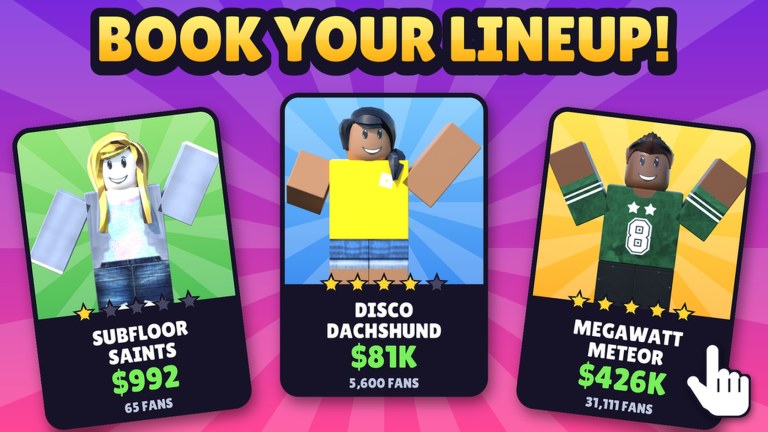
Festival Builder Tycoon runs on Roblox mobile, and plenty of players host entire festivals from a phone or tablet. Touch input is powerful once you learn a few habits — and punishing if you rush bookings or drop décor into path chokes. This guide covers mobile-first building, camera work, performance, and scheduling so your five-star attempts do not die to mis-taps. Pair it with the full Controls page for shared PC and mobile bindings, then jump to systems guides when you know what you want to fix.
We document Festival Builder Tycoon only (Place ID 76331960407574 by Convicted_Orange). Mobile tips for other festival Roblox games do not apply here.
Mobile strengths and traps
Strengths: you can check co-op friends’ plots quickly, tweak a truck between real-life tasks, and decorate in short sessions.
Traps: tiny confirm buttons on booking calendars, camera drift while placing props, and fatigue that leads to the infamous band clash when two stages start together. Read Band Schedule before you run multi-stage cards on a phone.
Touch building workflow
- Zoom out enough to see the full spine from entrance to main stage.
- Place structural pieces first — stage, path, Food Trucks — before Galaxy flair.
- After each truck or path segment, pinch-zoom and walk the route with your avatar.
- Rotate props deliberately; accidental spins are the number-one cause of blocked queue pockets.
- Save dense Galaxy Theme décor for a second pass when you are fresh.
If a prop fights you for more than thirty seconds, delete and replace. Mobile rebuilds are cheaper than fighting a stuck rotation.
Camera and precision tips
- Prefer landscape orientation for build sessions; portrait is fine for quick guest checks.
- Keep fingers off the lower UI while dragging so you do not open menus mid-place.
- Use slight camera elevation to judge apron clearance in front of stages.
- When aligning path junctions, zoom in until tile edges are obvious, place, then zoom out to verify flow.
- On tablets, a light stylus can help with dense décor — optional, not required.
Booking on a small screen
Booking mistakes cause most mobile rage quits. Slow down:
- Zoom the schedule UI if the client allows; if not, read every start time aloud before confirm.
- Apply the five clash-proof rules from Band Schedule: one stage first, buffers, no simultaneous adjacent starts, stagger, double-check.
- Book the opener only, watch two minutes of crowd flow, then book the mid card. Never fill the whole night in one frantic tap session.
- If you mis-tap an overlap, clear it immediately instead of hoping the night recovers.
Performance and battery
Reactive lights, big crowds, and Galaxy skyboxes can warm a phone. Practical habits:
- Close background apps before a serious show night.
- Lower Roblox graphics one step if frame pacing stutters during peak sets.
- Plug in for Festival of the Day polish sessions and long décor passes.
- Take a break after heavy building; tired thumbs create clashes and path mistakes.
- On very warm devices, finish the booking grid before you chase screenshot angles.
Session plans that work on mobile
Fifteen-minute session: move one truck, widen one choke, confirm tomorrow’s opener only.
Forty-minute session: full Festival Build spine check, add a truck, run a one-stage practice night.
Long session: décor pass + clash-proof multi-stage card + Guest Happiness watch, then stop while you are still accurate.
Short sessions compound. You do not need a three-hour PC block to improve a festival.
Co-op from mobile
Servers hold up to four players. When visiting friends via Players:
- Ask before editing someone else’s props.
- Use visits to photograph truck spacing and stage offsets you can copy later.
- Avoid heavy rebuilds on a friend’s plot from a janky connection.
- If your connection drops mid-booking on your own plot, re-open the calendar and verify no partial clash was saved.
What not to chase on mobile
- Fake Codes from random videos — none active as of November 2026
- Executor “mobile scripts” — see Scripts; legitimate play is safer and sufficient
- Copying layouts from Music Festival Tycoon or Chainsmokers Festival Tycoon clips
Spend attention on pathing, trucks, and schedules. Those systems respect touch input when you do.
Mobile checklist before doors open
- Spine walkable in landscape camera
- Trucks have queue pockets
- No décor pinch on the main path
- Calendar has buffers and no overlaps
- Battery or charger ready for the headliner
- You will watch the opener live, not AFK immediately
Hit that list, then enjoy the reactive lights. For deeper input notes open Controls; for the full guide index open the Guides Hub. Mobile players who confirm slowly and build in passes host nights just as strong as desktop producers.
Frequently Asked Questions
Quick answers to the most common Festival Builder Tycoon questions.
Can I play Festival Builder Tycoon entirely on mobile?
Yes. Build, decorate, book, and host on phone or tablet. Use landscape for precision building and slow down on the booking calendar to avoid clashes.
Why do I get more band clashes on my phone?
Small schedule UI and rushed confirms. Book one set at a time, add buffers, and double-check times before confirming multi-stage cards.
How do I place food trucks accurately on touch?
Zoom out for the spine, place on the main path with queue space, then zoom in and avatar-walk the approach to confirm nothing blocks the line.
Should I lower graphics on mobile?
If frames stutter during crowded shows or Galaxy décor, lower graphics one step and close background apps so booking and building stay responsive.
Are mobile scripts required?
No. There are no trustworthy public scripts for this title, and executors risk bans. Legitimate building and scheduling are enough.